
Correlation In LoadRunner: A Comprehensive Guide

In performance testing, LoadRunner is a name that resonates with many. Among its many features, one that stands out is Correlation. But what exactly is Correlation in LoadRunner? How does it work, and why is it so important?
Correlation in LoadRunner is a critical process that ensures the smooth execution of scripts during load testing. It handles the dynamic nature of client-server communication, making scripts more robust and reliable.
In this article we will discuss more. So keep reading!
What Is Correlation In LoadRunner?
In the realm of LoadRunner, a widely used performance testing tool, Correlation holds a significant place. It’s a technique that establishes a relationship between two variables or entities within the testing environment.
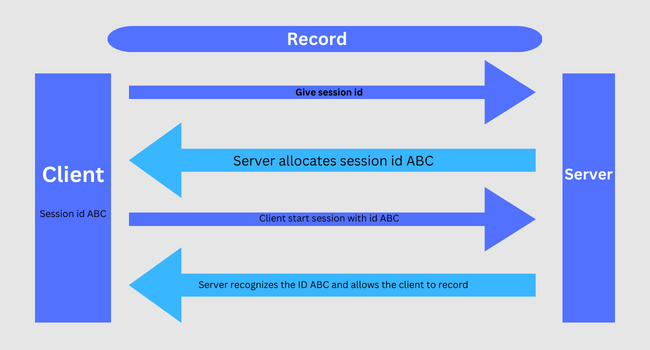
Correlation is all about dealing with dynamic values, which the server generates and passes to the client during a session. These values, often unique to each session, can include session IDs, transaction IDs, or any other data the server creates on the fly.
The Correlation process in LoadRunner captures these dynamic values from the server’s responses. Once captured, these values are then inserted back into subsequent requests from the client to the server.
This process is vital because the server often requires these dynamic values to maintain a consistent session or transaction. Without Correlation, a script might fail during load testing.
This is because the script, recorded with a specific set of dynamic values, might not work with a new set of values in a different session. Correlation solves this problem by capturing the new dynamic values in real time and using them in the script.

Types Of Correlation In LoadRunner
In the context of LoadRunner, a widely-used performance testing tool, Correlation is a critical process that deals with dynamic values in client-server communication.
Broadly, there are two types of Correlation in LoadRunner – Automatic Correlation and Manual Correlation. Both serve the same purpose of handling dynamic values but differ in their approach and level of control.
1. Automatic Correlation
Automatic Correlation is a feature LoadRunner provides that aims to simplify the correlation process. It’s designed to automatically detect dynamic values in the server’s responses and generate correlation rules for them.
This feature can be a significant time-saver, especially for beginners or those dealing with simple applications. The Automatic Correlation process involves LoadRunner scanning the server’s responses during the recording and replay of the script.
It compares the responses and identifies values that change between runs. These changing values are potential dynamic values that need Correlation.
Once identified, LoadRunner automatically generates correlation rules for these values. These rules instruct the script to capture the dynamic values during the replay and use them in subsequent requests.
However, Automatic Correlation has its limitations. It may only sometimes be accurate or successful, especially in complex applications with multiple dynamic values.
Also, it is less flexible as it only allows a little control over the correlation process. It’s estimated that Automatic Correlation is successful in only a small percentage of cases.
2. Manual Correlation
Manual Correlation, as the name suggests, involves manually writing correlation rules into your script. It requires a good understanding of the LoadRunner scripting language and the application being tested.
In Manual Correlation, you must identify the dynamic values that need Correlation. This involves carefully analyzing the server’s responses and the subsequent requests where these values are used.
Once identified, you write correlation functions into your script to capture these values and replace them in subsequent requests. Manual Correlation offers a higher level of control and accuracy compared to Automatic Correlation.
However, Manual Correlation can be time-consuming and requires more expertise. Experienced testers often prefer it when Automatic Correlation fails or is inaccurate enough.
Why Do We Need Correlation?
Correlation in LoadRunner is not just a feature; it’s a necessity. Here are some reasons why we need Correlation:
1. Handling Dynamic Values
We primarily need Correlation to handle dynamic values. These are values that the server generates and sends to the client during a session. They are unique to each session and can include session IDs, transaction IDs, or any other data the server creates on the fly.
These dynamic values can’t be predicted beforehand. And thus, they need to be captured in real-time during the script execution.
2. Maintaining Session Consistency
Many web applications maintain a session between the client and the server to track the user’s activities. The server often uses dynamic values, such as session IDs, to maintain this session consistency.
Without Correlation, the script would fail when encountering these dynamic values, leading to session inconsistency and script failure
3. Ensuring Script Reliability
Correlation increases the reliability of the script. Handling dynamic values ensures that the script can successfully execute in different sessions, even when the dynamic values change.
This makes the script more robust and reliable, increasing the accuracy of the load testing results.
4. Supporting Complex Scenarios
Many modern web applications involve complex client-server interactions with multiple dynamic values. Correlation supports these complex scenarios by capturing and handling all the necessary dynamic values.
Without Correlation, testing these complex applications would be challenging, if not impossible.
5. Improving Test Coverage
Correlation improves the test coverage. It ensures the script can handle all possible dynamic values.
This leads to a more comprehensive testing process, covering all aspects of the application’s performance.
6. Reducing Manual Effort
While manual Correlation does require some effort, it reduces the overall manual effort in the long run.
Once the correlation rules are set up, they can handle the dynamic values automatically, saving the tester from manually updating the script for each run.
7. Increasing Test Efficiency
By handling dynamic values, Correlation increases the efficiency of the load testing process. It ensures the script can run smoothly without interruptions, leading to quicker and more efficient testing.
Correlation is a crucial aspect of LoadRunner that ensures the smooth execution of scripts by handling dynamic values. It’s a powerful feature that enhances the reliability, coverage, and efficiency of load testing.
How To Do Correlation In LoadRunner?
Correlation in LoadRunner involves the following steps:
- Identify the dynamic values that need to be correlated.
- Capture these values using LoadRunner’s correlation functions, such as web_reg_save_param.
- Replace all occurrences of the dynamic value in the script with the captured parameter.
- Verify the changes by running the script again.
Correlation Challenge In LoadRunner
Correlation in LoadRunner, while a powerful and essential feature, comes with its own challenges. These challenges can make the correlation process complex and time-consuming.
Here are some of the common challenges faced while implementing Correlation in LoadRunner:
1. Identifying Dynamic Values
One of the primary challenges in Correlation is identifying the dynamic values that need to be correlated.
These values can be hidden in various parts of the server response and are difficult to spot, especially in complex applications with multiple dynamic values.
It requires a thorough analysis of the server responses and a good understanding of the application’s functionality.
2. Writing Correlation Code
Writing the correlation code manually can be daunting. It is especially challenging for beginners or those unfamiliar with the LoadRunner scripting language.
It requires a deep understanding of the correlation functions and how to use them effectively.
3. Handling Complex Correlation Scenarios
Some applications involve complex correlation scenarios with multiple dynamic values that must be correlated in a specific order.
Handling these complex scenarios can be challenging and requires high expertise.
4. Maintaining Correlation Rules
Over time, the correlation rules may need to be updated as the application evolves. This task can be challenging, especially in large scripts with many dynamic values.
Regular maintenance and updates are required to ensure the correlation rules remain valid and effective.
5. Dealing With Unpredictable Dynamic Values
Some dynamic values can be unpredictable and change in difficult ways with Correlation.
This can pose a significant challenge and require advanced correlation techniques or custom solutions.
6. Performance Overhead
Correlation involves additional processing to capture and replace dynamic values. This can add performance overhead to the script execution, especially in scripts with many correlation rules.
7. Limited Success of Automatic Correlation
Automatic Correlation can save time. It’s only sometimes successful, especially in complex applications.
It may not identify all the necessary dynamic values or generate the correct correlation rules. This can lead to complete or correct Correlation, requiring manual intervention.
Wrapping up
Correlation in LoadRunner is a critical aspect of performance testing. It ensures the smooth execution of scripts by handling dynamic values that change with each run.
While it does pose some challenges, understanding how to use Correlation effectively can greatly enhance your LoadRunner testing capabilities.
Frequently Asked Questions
What is the difference between automatic and manual Correlation in LoadRunner?
Automatic Correlation is a feature provided by LoadRunner that automatically identifies potential dynamic values and generates correlation rules for them.
On the other hand, manual Correlation involves directly writing code into your script to handle dynamic values. It requires a good understanding of the LoadRunner scripting language and the application being tested.
How does Correlation contribute to the success of a LoadRunner script?
Correlation plays a crucial role in the success of a LoadRunner script. It handles dynamic values that change with each run of the script.
These values, such as session IDs or server timestamps, are generated by the server and can’t be predicted.
What are some common challenges faced while implementing Correlation in LoadRunner?
Implementing Correlation in LoadRunner can pose several challenges:
- Identifying Dynamic Values: One of the main challenges is identifying the dynamic values that need to be correlated.
- Writing Correlation Code: Manual correlation code requires a good understanding of the LoadRunner scripting language.
- Maintaining Correlation Rules: Over time, the correlation rules may need to be updated as the application evolves.

- How a Gamertag Generator Helps Build Your Gaming Identity - July 3, 2025
- Namelix: AI Business Name Generator Explained Simply - May 20, 2025
- Best Mobile Speaker Cleaner Tools and Safe Cleaning Tips - May 1, 2025

